Recognize the case.
The color tells the installer which role that case performs in the supplied deployment plan.
A capable site network.
A simple chart for the person setting it up.
Digital Navigator configures the network before it reaches the job site. Your team places the colored cases, connects the labeled Cat6 cables, and follows the deployment chart.
The intelligence is in the design and configuration. The field instructions stay clear.
A collection of routers becomes useful when the equipment, connections, and instructions work together.
DigiNav designs the case roles, prepares the network settings, and tests the configuration. The customer receives a deployment plan that matches the actual cases and labeled connections.
The person on site follows the color chart and IN/OUT labels instead of choosing routing settings, working through bonding policies, or building the network from scratch.
The color tells the installer which role that case performs in the supplied deployment plan.
Case and port labels correspond to the customer’s chart, with clear IN and OUT instructions.
Place the cases at the planned locations, connect them, and confirm operation using the handoff instructions.
Starlink and a light-blue 5G case feed the gray access/backhaul case. Cat6 carries the configured network to dark-blue ASUS Wi-Fi cases at the work areas. Select a block to see its role. Also see the six-case alternative without a gray case.
Illustrative deployment flow. The final case count, port labels, cable paths, and internet-source connections are matched to your site. IN/OUT labels shown here are examples of the customer chart, not factory port names.
This configuration uses light-blue Katalyst Spark cases and dark-blue ASUS cases, with no dedicated gray access/backhaul case.
In the illustrated layout, Case 1 provides master internet access and hosts the Asterisk PBX. Case 2 provides central routing and DHCP, while Cases 3 and 5 extend the network to the ASUS Wi-Fi nodes in Cases 4 and 6. Cat6 connects the cases, and the local Wi-Fi zones serve phones and other devices.
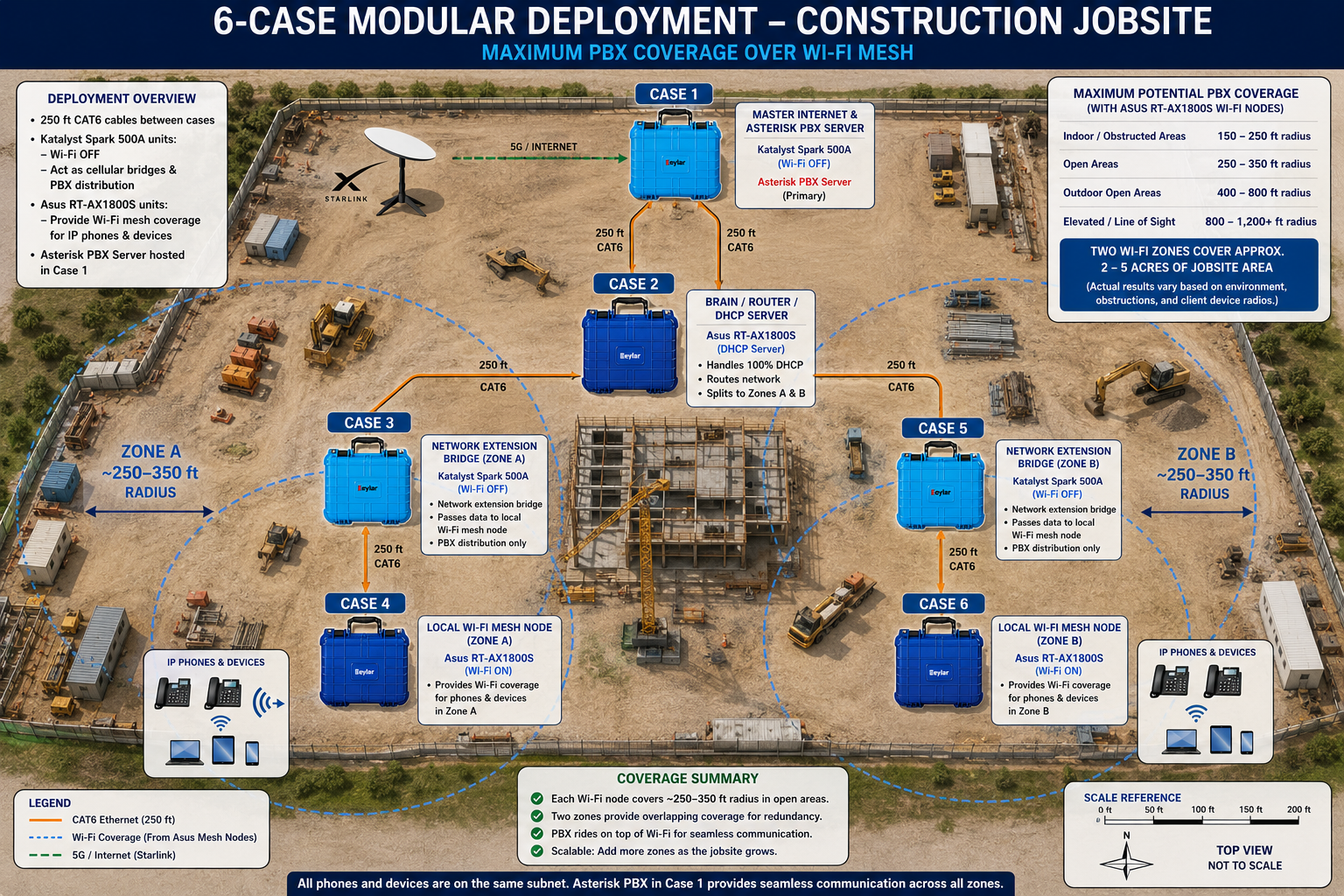
The chart follows the architecture. This example assigns the light-blue and dark-blue cases different network tasks from the gray-backhaul example above. DigiNav prepares the routing, bridge, Wi-Fi, and PBX configuration so the installer follows the chart supplied for that system.
The gray case is the site’s internet access point in this deployment. A Peplink BR2-family configuration brings Starlink and the planned cellular connection into the backhaul design.
Where bonding is specified, DigiNav configures the SpeedFusion service and connection policies as part of the system. The technician follows the supplied cable chart.
The light-blue case provides the 5G connection for its assigned role. Placement takes cellular reception and the planned cable route into account.
In the illustrated configuration, its labeled OUT connection feeds the gray case. The exact radio, carrier, and connection settings are selected during configuration.
Dark-blue ASUS Wi-Fi cases provide local wireless access at planned locations around the job site. Cat6 connects them to the site network.
DigiNav prepares the Wi-Fi role and settings. The field installer uses the supplied IN connection and location label, rather than configuring each router independently.
A customer-specific color flowchart shows which case goes where and which labeled cable connects to which port.
The chart can travel with the kit as a laminated deployment guide. Colors are paired with written roles, case identifiers, and port labels, so the installer has more than color alone to follow.
Match each case color and identifier to its position on the site diagram.
Run the labeled Cat6 cables along the planned routes and match the chart’s port labels.
Connect or enable the power source specified for each case and the Starlink equipment.
Follow the supplied startup and connection checks before the crew starts using the network.
The network engineering happens before deployment. The field instructions match the equipment in front of the installer.
A cable does not need to be described as a routing decision. It can be labeled for the two endpoints the installer needs to join.
Example labels. Your handoff guide uses the identifiers and connections assigned to your actual configuration.
DigiNav works through the radio choices, internet services, network roles, Wi-Fi settings, and connection plan. Bonding service configuration and the hardware needed for the selected handoffs are included in that design discussion.
The field team gets the result: configured cases and a deployment chart that describes what to connect.
Use Cat6 as the wired backbone between cases and place the dark-blue Wi-Fi cases at the work areas identified in the site plan.
| Site area | Example case role | Deployment purpose |
|---|---|---|
| Internet entry | Gray access / backhaul case | Bring the planned internet sources into the site network. |
| Cellular reception location | Light-blue 5G case | Place cellular connectivity where the site plan calls for it. |
| Site office or trailer | Dark-blue ASUS Wi-Fi case | Provide the local wireless network for that work area. |
| Additional work area | Another dark-blue ASUS Wi-Fi case | Extend the wired distribution to another planned Wi-Fi location. |
Cable routes, Ethernet segment lengths, Wi-Fi placement, power, and any required switching are designed for the actual site. Coverage is planned around the environment and the equipment selected.
The office moves. Another work area opens. A different radio becomes the better fit.
A configurable deployment gives you a way to revisit the layout and equipment as the project changes. DigiNav can update the case configuration and deployment chart to match the next phase.
Our radio-agnostic BYOND and 5GIRL platforms support this approach: the case is part of a system that can be reconfigured over time.
With 11 case colors and custom logo branding available, the enclosure can carry your identity as well as its network role.
For this example, gray, light blue, and dark blue have specific functions. We agree the color assignments and labels as part of your deployment so the chart and cases stay consistent.
Tell us about the site, the connections, and the people setting it up. We’ll help turn the requirements into a coordinated system of cases.
(469) 389-0189